前言
-
完成效果图
-
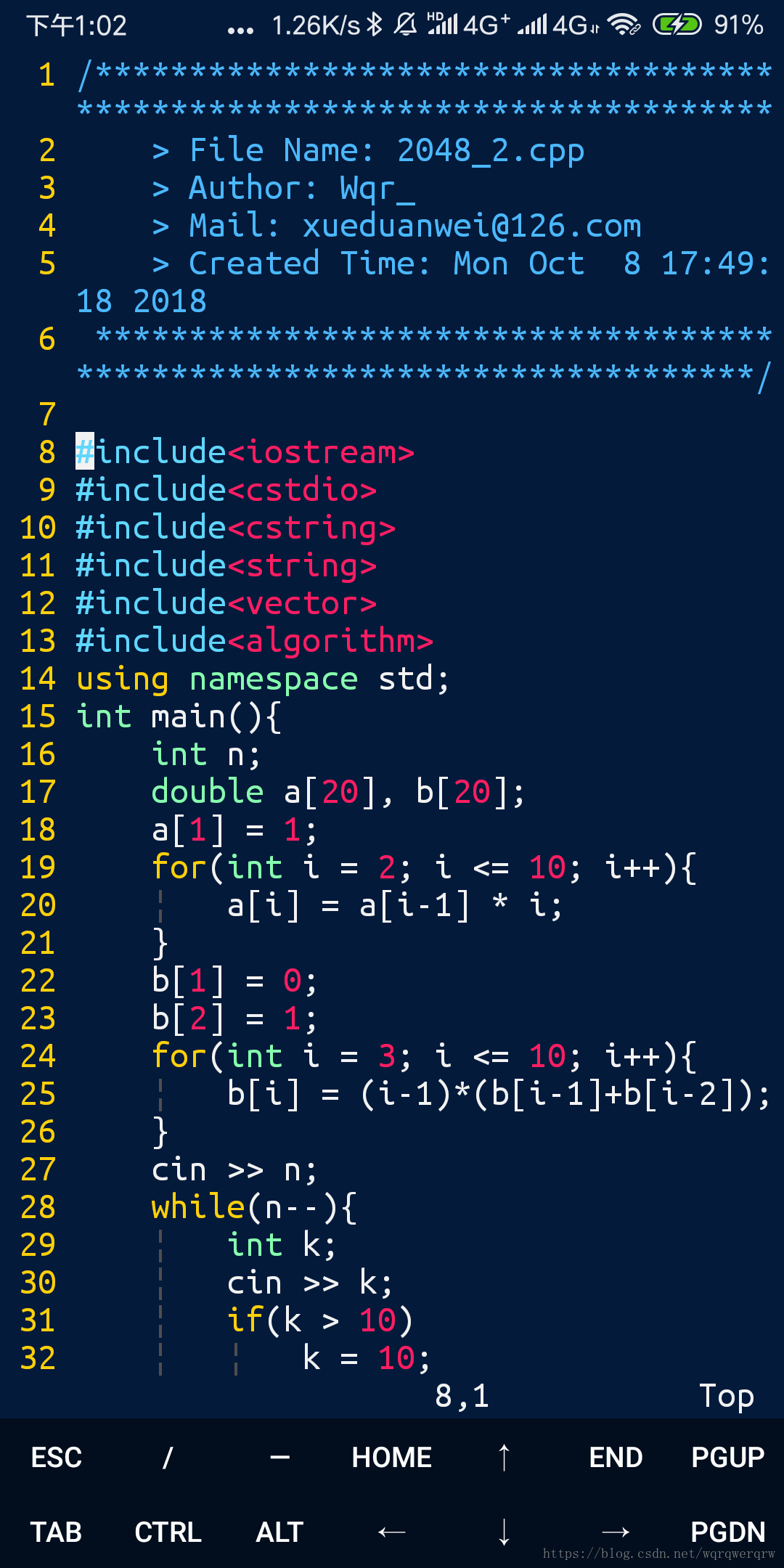
-
本文在Termux 高级终端安装使用配置教程的基础上进行vim的更深一步配置
-
感谢大佬的教程
1. gcc的安装
- 输入
pkg install clang - 这个我不确定对不对了,如果出了错误请按照如下操作
输入
gcc
会弹出一些信息,其中有一个pkg install ***
输入就可以了
2. vimrc的配置
-
输入命令
vim ~/.vimrc -
在vimrc中添加如下代码
nmap <c-c> :w! ~/storage/shared/copy.txt

set tabstop=4
set softtabstop=4
set shiftwidth=4
set autoindent
set cindent
set smarttab
:set ts=4
:set expandtab
:%retab!
syntax on
set laststatus=0
set number
filetype on
set showcmd
if version >= 603
    set helplang=cn
    set encoding=utf-8
endif
autocmd BufNewFile *.cpp,*.[ch],*.sh,*.java exec ":call SetTitle()"
func SetTitle()
    if &filetype == 'sh'
        call setline(1,"\#########################################################################")
        call append(line("."), "\# File Name: ".expand("%"))
        call append(line(".")+1, "\# Author: Wqr_")
        call append(line(".")+2, "\# mail: xueduanwei@126.com")
        call append(line(".")+3, "\# Created Time: ".strftime("%c"))
        call append(line(".")+4, "\#########################################################################")
        call append(line(".")+5, "\#!/bin/bash")
        call append(line(".")+6, "")
    else
        call setline(1, "/*************************************************************************")
        call append(line("."), "    > File Name: ".expand("%"))
        call append(line(".")+1, "    > Author: Wqr_")
        call append(line(".")+2, "    > Mail: xueduanwei@126.com ")
        call append(line(".")+3, "    > Created Time: ".strftime("%c"))
        call append(line(".")+4, " ************************************************************************/")
        call append(line(".")+5, "")
    endif
    if &filetype == 'cpp'
        call append(line(".")+6, "#include<iostream>")
        call append(line(".")+7, "#include<cstdio>")
        call append(line(".")+8, "#include<cstring>")
        call append(line(".")+9, "#include<string>")
        call append(line(".")+10, "#include<vector>")
        call append(line(".")+11, "#include<algorithm>")
        call append(line(".")+12, "using namespace std;")
        call append(line(".")+13, "")
    endif
    if &filetype == 'c'
        call append(line(".")+6, "#include<stdio.h>")
        call append(line(".")+7, "")
    endif
    autocmd BufNewFile * normal G
endfunc
map <c-g> :call CompileRunGcc()<CR>
func! CompileRunGcc()
    exec "w"
    if &filetype == 'c'
        exec "!g++ % -o %<"
        exec "! ./%<"
    elseif &filetype == 'cpp'
        exec "!g++ % -o %<"
        exec "! ./%<"
    elseif &filetype == 'java'
        exec "!javac %"
        exec "!java %<"
    elseif &filetype == 'sh'
        :!./%
    endif
endfunc
map <c-d> :call Rungdb()<CR>

func! Rungdb()

    exec "w"

    exec "!g++ % -g -o %<"

    exec "!gdb ./%<"

endfunc
autocmd FileType c,cpp map <buffer> <leader><space> :w<cr>:make<cr>
set completeopt=preview,menu

"允许插件
filetype plugin on
"共享剪贴板

set clipboard+=unnamed
set autowrite
set enc=utf-8
set fencs=utf-8,ucs-bom,shift-jis,gb18030,gbk,gb2312,cp936
"语言设置

set langmenu=zh_CN.UTF-8

set helplang=cn
filetype plugin on
filetype indent on
set iskeyword+=_,$,@,%,#,-
:inoremap ( ()<ESC>i

:inoremap ) <c-r>=ClosePair(')')<CR>

:inoremap { {<CR>}<ESC>O

:inoremap } <c-r>=ClosePair('}')<CR>

:inoremap [ []<ESC>i

:inoremap ] <c-r>=ClosePair(']')<CR>

:inoremap " ""<ESC>i
:inoremap ' ''<ESC>i
function! ClosePair(char)
    if getline('.')[col('.') - 1] == a:char
        return "\<Right>"
    else
        return a:char
    endif
endfunction
filetype plugin indent on
"打开文件类型检测, 加了这句才可以用智能补全

set completeopt=longest,menu-
解释
-
我在根目录下创建了一个名为
copy.txt的文件,用来作为系统间复制的桥梁,这个copy.txt需要手动进行创建<c-c>代表ctrl + c 以此类推- 在此操作后会执行命令
:w! ~/storage/shared/copy.txt将文件保存到copy.txt中 - 需要注意的是,执行此操作需要文件有相应的权限,使用
chmod指令操作,由于条件比较复杂,具体请自行百度
-
ctrl + g可以启用gcc进行编译,ctrl + d可以启用gdb进行调试 -
预添加了头文件和一些信息,可以按需求修改
-
3. 插件的安装(可跳过)
1. 安装vundle
-
首先
cd ~/.vim如果没有此文件夹则使用mkdir创建一个 -
在.vim文件夹中创建文件夹bundle
mkdir bundle -
执行
git clone https://github.com/VundleVim/Vundle.vim.git ~/.vim/bundle/Vundle.vim- 可能没有git 按提示操作即可
-
在.vimrc中前添加如下代码
set nocompatible              " be iMproved, required
filetype off                  " required

" set the runtime path to include Vundle and initialize
set rtp+=~/.vim/bundle/Vundle.vim
call vundle#begin()
" alternatively, pass a path where Vundle should install plugins
"call vundle#begin('~/some/path/here')

" let Vundle manage Vundle, required
Plugin 'VundleVim/Vundle.vim'

" The following are examples of different formats supported.
" Keep Plugin commands between vundle#begin/end.
" plugin on GitHub repo
Plugin 'tpope/vim-fugitive'
" plugin from http://vim-scripts.org/vim/scripts.html
" Plugin 'L9'
" Git plugin not hosted on GitHub
Plugin 'git://git.wincent.com/command-t.git'
" git repos on your local machine (i.e. when working on your own plugin)
Plugin 'file:///home/gmarik/path/to/plugin'
" The sparkup vim script is in a subdirectory of this repo called vim.
" Pass the path to set the runtimepath properly.
Plugin 'rstacruz/sparkup', {'rtp': 'vim/'}
" Install L9 and avoid a Naming conflict if you've already installed a
" different version somewhere else.
" Plugin 'ascenator/L9', {'name': 'newL9'}

" All of your Plugins must be added before the following line
call vundle#end()            " required
filetype plugin indent on    " required
" To ignore plugin indent changes, instead use:
"filetype plugin on
"
" Brief help
" :PluginList       - lists configured plugins
" :PluginInstall    - installs plugins; append `!` to update or just :PluginUpdate
" :PluginSearch foo - searches for foo; append `!` to refresh local cache
" :PluginClean      - confirms removal of unused plugins; append `!` to auto-approve removal
"
" see :h vundle for more details or wiki for FAQ
" Put your non-Plugin stuff after this line
2. 安装缩进可视化插件
- link
- 将文件下载并解压到
~/.vim/bundle/目录下 - 在前面刚添加的代码块中添加
Plugin 'Yggdroot/indentLine' - 在前面添加的代码块后添加
let g:indentLine_color_term = 239
本博客所有文章除特别声明外,均采用 CC BY-SA 4.0 协议 ,转载请注明出处!